Discrete Model Genetic Algorithm
The Discrete Model Genetic Algorithm (DMGA) module employs user-defined interacting and non interacting models to fit sedimentation velocity data to parameters of those models. While there is no restriction on the type of model that can be built to fit a particular system, the method is most often used for fitting reversibly associating systems, such as oligomerization or self-association, or hetero-associating systems. The method uses genetic algorithms to optimize non-linear fitting problems using stochastic approaches. The user has to define a model and the constraints for the parameters of the model to initialize the DMGA routine. The fit is performed on the LIMS using the Discrete Model GA Control.
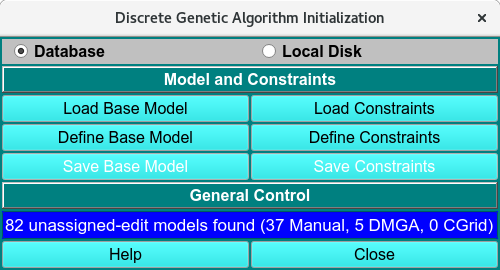
Discrete Genetic Algorithm Initialization
DMGA Process:
1. If an existing model is available, Load Base Model and use the Load Distribution Model dialog to select the desired model. If a model needs to be created first, use Define Base Model to open the Model Editor window and select Save Base Model.
2. If constraints for all parameters have been defined previously, Load Constraints will allow the user to select a predefined constrained from the Load Distribution Model dialog. If a set of constraints needs to be created first, use Define Constraints to open the Discrete Model GA Constraints Editor <dmga_init_constr>, enter the parameter constraints for the Components and any Associations (reactions), and Accept the changes. At this point, Save Constraints in the main window will allow you to save the DMGA initialization to the LIMS database. By default, the constraints model will be named with the current timestamp, but selecting Edit allows you to use a custom name in the database.
3. To start the analysis, select the same constraints model in the Setup Discrete Model GA Control on the LIMS page.